MacWise Terminal Emulation
for Macintosh
Version 10.7.58 Released
March 15th, 2005
Feature / Fix - Added a telnet option, "Use
the tc shell to log in".
When this option is enabled, MacWise first logs into the Mac unix
tc shell before issuing telnet commands and opening the connection.
This option provides more compatibility with host computers that
request the terminal type. It could prevent error messages from
the host such as "Connection refused by host" or "Invalid terminal
type".
You will see this new
option when you select Telnet Connection... from the Connection
Menu in MacWise.
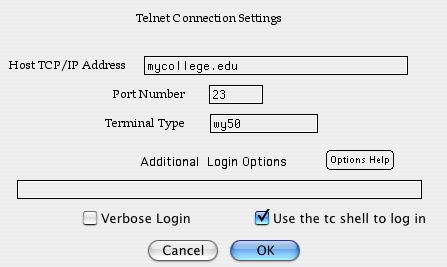
Host computers that request the terminal type may work better because
MacWise opens a connection to the Mac tc shell first and then sets
the terminal type using the setenv command
as well as telnet environ define commands.
If this option is disabled, then only the environ define command
is used and MacWise logs directly into telnet on the Mac before issuing
environment commands and connecting to the host.
You can enter any terminal type into the Terminal
Type field. If you are not sure what to enter, just let it default
to the terminal type set by MacWise.
The only disadvantage to using this option is that
the user is left in the tc shell after the host closes the telnet
connection. If you are a system administrator and you do not want
your users to have access to the Mac tc shell, you can disable
this option (if you can connect to the host and it recognizes your
terminal type).
The Verbose Login option
When
enabled, all of the commands that MacWise issues during the login
process will be displayed including responses from the host. This
can help diagnose login problems.
Additional Login Options
The average user will never need to enter options into this field.
You can click on the Options Help button to see what the additional
options are.
You can get the new version at www.macwise.com
Click on the link to download the demo.
Note: Site License
owners - let me know if you need this upgrade.
I will re-compile
your site license and email it to you.
Registered owners
of MacWise 10.6 or later can upgrade for free.
Just install the demo. No re-registration is required.
Earlier versions require an upgrade fee...
$49 per user upgrade for previous MacWise version 10 owners.
$75 per user upgrade for previous MacWise version 4 owners.
To purchase an upgrade, visit www.macwise.com
and click on the Buy button.
MacWise allows a Macintosh
to be used as a terminal -- connected to a host computer directly,
by modem, local area network or over the Internet. The emulators
support video attributes such as dim, reverse, underline, 132-column
modes, protected fields and graphic characters sent from the host
computer, as well as enhanced Viewpoint mode. Features include
phone list and dialer for modems, on-screen programmable function
keys, connection scripts and more.
MacWise emulates ADDS Viewpoint, Wyse 50, Wyse 60, Wyse 370, Televideo
TV 925, DEC VT100, VT220 and Prism terminals. Supports ANSI color.
Esprit III color is also supported in Wyse 370 mode.
For more information and a demo, visit www.macwise.com
Visit Carnation Software for other Macintosh Software at www.carnationsoftware.com
Connectivity
1. Built in Modem
2. Telnet / TCP/IP
3. SSH Secure Shell
4. Serial ports via USB to Serial adaptor.
5. Also communicates directly with the Mac unix shell
If your office uses a business computer that allows
you to log in as a terminal, you can use MacWise to access your
business data from your Macintosh when you are out of the office
(or in the office)
MacWise will connect your Mac to the office computer using your
modem or with ethernet using a lan connection in your office or
over the internet.
Rich Love
Carnation Software
richlove@carnationsoftware.com
http://www.carnationsoftware.com
512 858-9234
| |
 Keep
up to date with Carnation Software RSS
News Keep
up to date with Carnation Software RSS
News |

